The Complete Apple Watch Comparison Chart (Tech Specs)
A detailed chart of all the differences between Apple Watches
This article is valid as of December, 2025 (with latest watches being: Apple Watch 11, SE 3, and Ultra 3). It does not take into account watches that are released afterwards.
Intro
Every year, Apple comes out with a new Apple Watch, and they update their comparison page. They allow a maximum of 3 watches to be compared and it isn’t obvious what the actual differences are between the watches. I manually went through comparisons of each watch and I attempted to make a detailed table that makes things visually obvious what has or hasn’t changed between each watch.
Ken Rockwell has a detailed comparison page which was very close to what I aimed to do. Mine adds color 🌈 and tries to only focus on differentiating features.
TL;DR / Main Differences
Ultra 3 > Ultra 2 > 11 > 10 > Ultra 1 > 9 > SE 3>> 8 > 7 > 6 >> SE 2 >> 5 > 4 > SE 1 >> 3 >> 2 >> 1
I wouldn’t get anything below an SE2. Series 5 and below are no longer getting software updates.
If possible, I would try to avoid an Ultra 1 + Series 8 or lower. I don’t know how much longer Apple will be supporting them (2026 or 2027?) but do know that they will be the first ones to lose support once Apple makes that decision.
Here’s what each watch adds over the previous watch:
- Series 6 adds an always on screen, ECG, upgraded heart-rate sensor, blood oxygen sensor (not very useful in my opinion). Loses crash detection over the SE2
- Series 7 adds fast charging and 1mm screen size (neither are worth upgrading)
- Series 8 adds crash detection (hopefully you never need to use it)
- SE 3 adds a new processor, sleep apnea notifications, on-device Siri, storage increased to 64GB. Does not have ECG or ultra wideband chip.
- This is the first major upgrade over the 6
- They also advertise a feature called “double tap”, but that is actually available in older watches as an accessibility feature.
- Series 9 adds a brighter screen.
- Newer series 9 removed blood oxygen capability, but was “added back” in August of 2025 by moving processing to a paired iPhone.
- “For models of Apple Watch purchased in the United States on or after January 18, 2024 with part numbers ending in LW/A, the Blood Oxygen data analysis is performed on iPhone, and results can be viewed in the Health app.”
- Series 10 adds a 2mm bigger and slightly better screen, water depth, water temperature.
- Did not come with a blood oxygen feature but has been added in August of 2025 by moving processing to a paired iPhone.
- Series 11 has 30% better battery life over the 10 + adds 5G capability.
- Ultra adds scuba diving capability, 50% longer battery (vs 10), better microphones and speakers, better GPS, action button.
- It has an older processor (same as series 6-8), does not have sleep apnea notifications, “double tap gesture”, or on-device Siri.
- 32GB capacity
- Ultra 2 adds a brighter screen, same processor as 9+
- Ultra 3 adds a “wide-angle screen”, 17% better battery life (vs Ultra 2), satellite connectivity, 5G connectivity.
Very few people actually need the Ultra, but the extra battery life is pretty nice.
Comparison Table
This is probably what you came here for. The technical specification (tech specs) comparison table. The table is pretty big (80+ rows, 15+ columns) and is best viewed on desktop. I know there’s a lot of data there (even more data at the “Full Detail” sheet). If this gives you data overload, that’s totally understandable. Stick to the TLDR / Main Differences and Choosing a Watch sections for my conclusions.
Choosing a Watch
Processor
Apple watch’s main upgrade happens every ~3 years whenever the processor (SiP = System in Package) gets upgraded:
- ~S4 SiP = Series 4, 5, SE
- ~S6 SiP = Series 6, 7, 8, SE2, Ultra
- ~S9 SiP = Series 9, 10, 11, SE3, Ultra 2, Ultra 3
Even though Apple has an Ex. S6, S7, and S8 SiP, each one of those have the same CPU and are thus basically the same chip, just renamed. So you won’t see much (if any) performance difference between them.
The takeaway from this is if you’re going to get, for example, a series 5, you’re better off getting a series 6. If you’re going to get a series 8, you’re better off getting a 9. It’s only a one year jump in watch but a ~3 year jump in processor. The processor will be faster and the watch will be supported with software updates for a few years longer.
Unless a watch with a new processor was just released, buying a used watch can be a great way to get a similar-to-new performing watch at a decent discount. Ex. if you’re going to get a new series 11, a used series 10 or 9 will perform similarly. For reference, as of 2025, you can get series 9 apple watches on eBay for ~$200, series 10 for ~$250. A new series 11 from Apple is $430. Typically new watches fall off in price pretty good after a year or two.
Screen Size
Now that you know which “processor group” you’re aiming for, the next step would be to decide how big you want the watch to be. If you have a small wrist (female), you might not like the larger watches. Ex. if you don’t like the larger watches, then you won’t be getting an Ultra as those are only available in 49mm.
If you live close to one, I’d recommend going into an Apple store (or any place that sells Apple watches) and trying them on to get a feel for things!
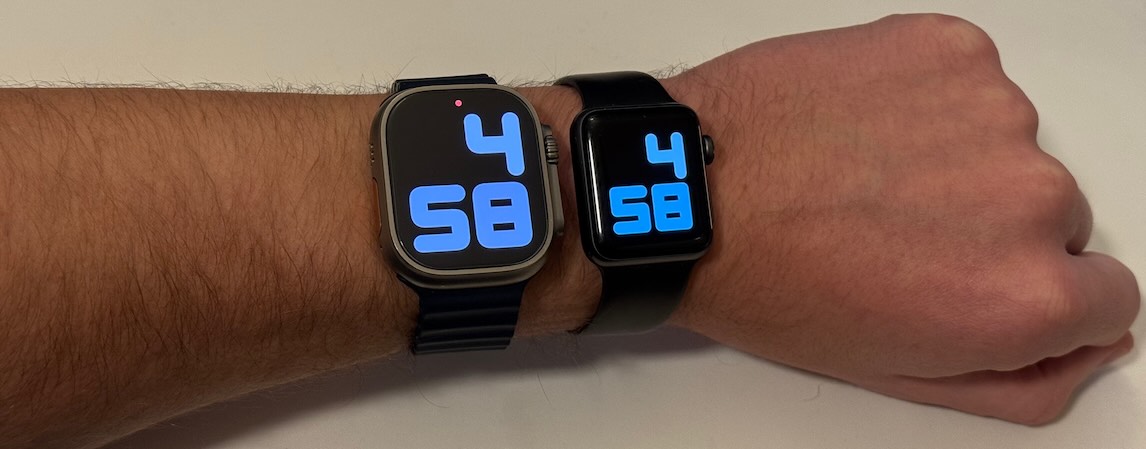 Apple Watch Ultra 2 vs Series 3 38mm, Model: Matt Popovich
Cellular Connectivity
At this point, you should be down to a smaller number of potential watches. The main feature to decide on is do you want cellular connectivity or not. Cellular connectivity is only needed if:
- You want to get notifications on your watch whenever your phone is not nearby (Ex. going for a run without your phone or while surfing)
- And you don’t mind paying a monthly fee for this capability
- You want the ability to make emergency 911 calls
A cellular data plan for your watch will typically cost ~$10/mo. Worth noting that even without a cellular data plan, the cellular watches will still be able to make emergency calls, even without active service. GPS only watches cannot make emergency 911 calls if you are not nearby your phone as they do not have the required hardware (cell modem) to place a call on their own. This is why I got my parents cellular-capable watches, even though the watches are not connected to a cell plan.
Features of Interest
- If you want the best battery life (36-42hr), you’ll need to get an Ultra. Otherwise, you’ll have ~24-18hr of battery.
- This can be extended by turning off the “always on display”.
- ECG and blood oxygen are available on all newer watches except the SEs.
- Sleep apnea detection, crash detection, water temperature, water depth are only available on newer models.
- Satellite connectivity is only available in the Ultra 3.
Outro
Thanks for reading, I hope this helped. Please let me know of any suggestions or corrections in the comments below.
The best ways to say thanks for my research are by simply following my social media accounts here or by purchasing your watch (with no extra cost to you) through one of my referral links in the top column of the comparison table.
Disclaimer: This video is not sponsored by, endorsed by, or affiliated with Apple Inc. Please do your own research before making any purchases. Matt Popovich does not provide a warranty for any of the listed information and does not guarantee any expressed or implied result. The specifications, features, and data shown in this video are accurate to the best of my knowledge based on publicly available information at the time of publication. As the technology sector is constantly evolving and changing, use the information provided at your own risk as some of the information provided may be outdated, no longer applicable, or even, unfortunately, incorrect.